Build Your Own Last Train Reminder From Japan's Open Transit Data
In the reel I said that a lot of paid apps did not invent anything. They take free public data and make it nice to use. To show it, I used Shuden, a last train app I am building, with a Lock Screen card that counts down to the moment you have to leave the bar.
Shuden is not out yet, and the screens in the reel are a mockup. But the core of it is something you can build yourself this week. Here is how: get a key for Japan's open transit data, find the last departure from your station, turn it into a "leave by" time, and put it on your Lock Screen.
Free data, nicer packaging
The example in the reel was Cal AI, the calorie app that MyFitnessPal bought this year. TechCrunch reported more than $30 million in annual revenue. What interests me is the pattern behind it.
Japan publishes plenty of this kind of data for free. Train timetables come through the Public Transportation Open Data Center (ODPT). The Japan Meteorological Agency runs a developer portal with observations and disaster information feeds.
The value comes from combining sources. Timetable, plus your location, plus the current time, and you know the exact minute you have to leave to catch the last train home. In Tokyo, missing it means a very expensive taxi.
Get an ODPT key
Everything starts at the ODPT developer site. Registration is free.
- Read the rules on the Rules/Guidelines page first. You agree to them when you sign up.
- Open User Registration and fill in the form. It asks for your name in your own alphabet and in Roman letters, an address, a phone number and an affiliation. If you are building on your own, the form tells you to write Individual.
- Confirm your email from the link they send you.
- Wait. The site says approval can take up to two business days, and they reply by email.
- Log in. Your access token, which the API calls the consumer key, is under the Access token button. The full API specification is also behind the login.
Questions go to the center by email, not to the rail companies. The site is explicit about that.
Check which lines you can actually use
Japan does not publish every train timetable under the same terms. On the ODPT catalog today, station timetables come in two groups.
Under the regular Public Transportation Open Data Basic License: Tokyo Metro, Toei (subway, Tokyo Sakura Tram and the Nippori Toneri Liner), Yokohama Municipal Subway, the Rinkai Line, Yurikamome, Tsukuba Express and Tama Monorail.
Under the Challenge Limited License only: JR East (some lines around Tokyo, no Shinkansen), Tokyu, Odakyu, Keio, Keikyu, Seibu, Tobu and Sotetsu.
The difference matters if you want to ship. The Basic License lets you build apps for profit or not, as long as you follow it and the developer guideline. The Challenge license is tied to the Public Transportation Open Data Challenge 2026: you use the data for a contest entry, a company using it has to enter and offer the features free during the challenge, and the permission ends on March 12, 2027. JR East adds its own condition that you cannot use its data to build something that competes with its services.
My mockup used the Keio Inokashira Line from Shibuya, so in real life that version only works as a contest entry. If you want something you can keep, start with a subway line.
Each operator offers several data types. For a last train reminder you want station timetables (every departure from one station, per direction and per day type). Train timetables (every stop of one train) are useful later, to check where the train really ends.
Ask for the last train
The API is plain REST with JSON responses. Every object has an ID like odpt.Station:TokyoMetro.Chiyoda.YoyogiUehara, and you can list a company's stations with the odpt:Station endpoint filtered by odpt:operator. This request asks for the weekday timetable at Yoyogi-Uehara on the Chiyoda Line, toward Kita-Ayase:
curl -s "https://api.odpt.org/api/v4/odpt:StationTimetable?\
odpt:station=odpt.Station:TokyoMetro.Chiyoda.YoyogiUehara&\
odpt:railDirection=odpt.RailDirection:TokyoMetro.KitaAyase&\
odpt:calendar=odpt.Calendar:Weekday&\
acl:consumerKey=YOUR_KEY" > timetable.json
Without a key the server answers Require acl:consumerKey., so if you see that, your key is missing from the URL. Data under the Challenge license is served from a separate host, api-challenge.odpt.org.
The response is a list of timetables. Inside each one, odpt:stationTimetableObject holds the departures, each with odpt:departureTime, odpt:destinationStation and, when the operator provides it, an odpt:isLast flag. Times are plain hours and minutes, and the last trains run after midnight, so sort 00:20 after 23:50 before you pick the last one:
jq -r '.[0]["odpt:stationTimetableObject"]
  | map(select(.["odpt:departureTime"]))
  | sort_by(.["odpt:departureTime"]
      | if . < "03:00" then "1" + . else "0" + . end)
  | last
  | "\(.["odpt:departureTime"]) to \(.["odpt:destinationStation"][0])"' timetable.json
Look at the destination before you trust the time. The last train from a station often stops short of the end of the line. If your station is past where it terminates, that is not your last train, and you need the last one that actually goes home.
Turn it into a "leave by" time
The departure is only half the answer. You also need how long it takes to walk to the platform. You can let people type it in, or ask MapKit: MKDirections with a walking transport type and calculateETA returns an expected travel time in seconds.
Leave by is the departure minus the walk. Then schedule a reminder a few minutes before that with a local notification:
import UserNotifications

func scheduleReminder(lastTrain: Date, walkMinutes: Int, warnMinutes: Int = 15) async throws {
    let leaveBy = lastTrain.addingTimeInterval(TimeInterval(-walkMinutes * 60))
    let remindAt = leaveBy.addingTimeInterval(TimeInterval(-warnMinutes * 60))

    let content = UNMutableNotificationContent()
    content.title = "Leave in \(warnMinutes) min"
    content.body = "Your last train leaves at \(lastTrain.formatted(date: .omitted, time: .shortened))."

    let parts = Calendar.current.dateComponents([.year, .month, .day, .hour, .minute], from: remindAt)
    let trigger = UNCalendarNotificationTrigger(dateMatching: parts, repeats: false)
    try await UNUserNotificationCenter.current().add(
        UNNotificationRequest(identifier: "last-train", content: content, trigger: trigger))
}
Ask for notification permission first, and remember that a timetable is a schedule, not a promise. Delays happen.
The Lock Screen card from the reel
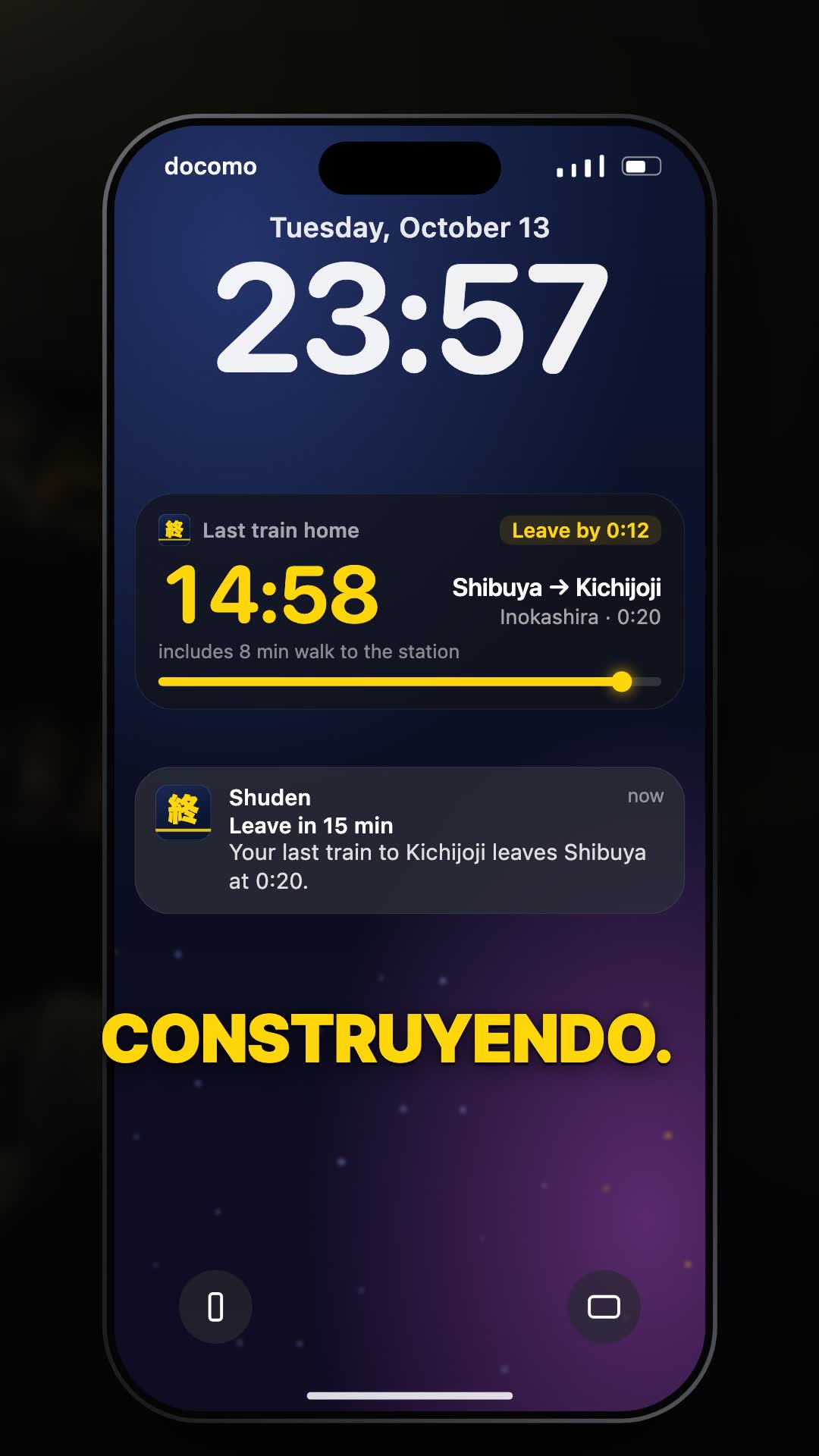
What the mockup shows is a Live Activity: a card on the Lock Screen with a countdown, the leave by time and the line, plus the notification under it. This is how I would wire it with Apple's ActivityKit.
- Add a widget extension and define an
ActivityAttributestype: fixed data like the line and stations, and aContentStatewith the leave by and departure times. - Start it from the app while it is in the foreground with
Activity.request(attributes:content:pushType:). Apple notes you can also start one from the background through an app intent that conforms toLiveActivityIntent, for example a Control Center button. - For the countdown, use SwiftUI's
Text(timerInterval:countsDown:). The system draws the timer itself, so you do not need to push an update every second. - Set the
staleDateto the departure, so the card shows as outdated once the train has gone.
Two limits from Apple's docs to design around. A Live Activity can stay active for up to eight hours, and then it can sit on the Lock Screen for up to four more. Start it in the evening, not at breakfast.
Before you publish anything
The ODPT developer guideline has rules that are easy to miss and quick to follow:
- Say in the app that the data comes from the Public Transportation Open Data Center and that its accuracy is not guaranteed.
- Give an email for questions about your app, so people do not call the rail company.
- Show when you fetched the timetable, and refresh it within a week of the center announcing an update.
- Do not republish the raw data in a form others can reuse. Showing it inside your app is fine. Serving it from your own public API is not.
If transit is not your thing, the same idea works with other data. There is a list on GitHub called Public APIs with hundreds of free sources. Pick one, then think about who has a problem it could solve when you combine it with something else.